Fresh content helps SEO only when the search itself rewards recency. Google gives extra weight to newer pages for news, trending topics, recurring events and information that changes often. For evergreen searches such as “how to write a meta description”, a page updated last week gets no automatic edge over a better page from 2021.
So the useful question is not “how often should I publish?” It is “does this search reward recent pages, and is my page still correct?” This guide covers what Google has actually said, how to check any query in a few minutes, which popular claims have no evidence behind them, and how to decide between updating an old post and writing a new one.
What “fresh content” means in SEO
People use “fresh content” for four different things:
- New pages. A new post or landing page on a topic you have not covered.
- Substantial updates. Rewritten sections, replaced facts, new steps, answers to questions the page missed.
- New media. Current screenshots, a new chart, a video, an updated data table.
- New internal links. Links from newer posts to an older page. These help Google find and recrawl the older page, and they help readers reach it.
The first two matter most, because they change what a page says. Google has never published a list of the signals its freshness systems use. The lists you see in guides (date first crawled, share of the page that changed, how fast new links arrive) come from old patents or from guesswork. A patent shows an idea Google explored, not a system it runs today, so treat those lists as hypotheses.
Before you change anything, you need to know which pages you have, what each one earns and which are slipping. If you have not done that yet, start with how to do a content audit. The rest of this guide assumes you can see clicks, impressions and position per page in Search Console.
Is fresh content a Google ranking factor?
For some queries, yes, and Google says so. Its guide to ranking systems (last updated December 2025) describes “query deserves freshness” systems “designed to show fresher content for queries where it would be expected.” Its examples are someone looking for reviews of a film that has just come out, and someone searching for news about an earthquake that has just happened.
Note the condition: “where it would be expected.” Freshness works per query, not per site. Google is not grading your site on how often you post. It is deciding, search by search, whether recent results serve the person better.
The searches that get this treatment:
- News and recent events: an outage, an election result, a product launch.
- Trending topics: anything with a sudden spike in searches.
- Recurring events: a yearly conference, tax deadlines, Black Friday.
- Fast-changing information: software versions, prices, rules, “best X” lists.
For everything else, freshness is at most a tiebreaker. A definition or a how-to that has not changed in years ranks on relevance and quality. Updating it can still help, but because the page gets better, not because the date moved.
A short history of Google’s freshness updates
| Year | Change | What it did |
|---|---|---|
| 2007 | Query Deserves Freshness (QDF) | Google’s Amit Singhal described the idea in a New York Times interview rather than a Google post: a system that spots when a topic suddenly becomes “hot” and shows newer pages for it. |
| 2010 | Caffeine | Google’s Caffeine announcement described a rebuilt indexing system that added pages to the index much sooner after crawling them. |
| 2011 | Freshness update | The Freshness update announcement extended recency to more kinds of search: recent events, hot topics, recurring events and frequently updated information. |
| 2019 | Featured snippets freshness | Google’s reintroduction to featured snippets described a change to better spot queries where fresh information helps, so the snippet shows current information. |
The 2011 numbers are often misquoted. Google’s announcement of the Freshness update said it affected roughly 35% of searches, but results changed noticeably for only about 6 to 10%. “35% of searches affected” does not mean a third of rankings moved.
Every one of these changes was about matching recency to searches that need it, or about indexing new pages faster. None says Google rewards a site for publishing more often, or rewards a page just for being edited.
How to tell if your search is freshness-sensitive
You can check any query in about five minutes:
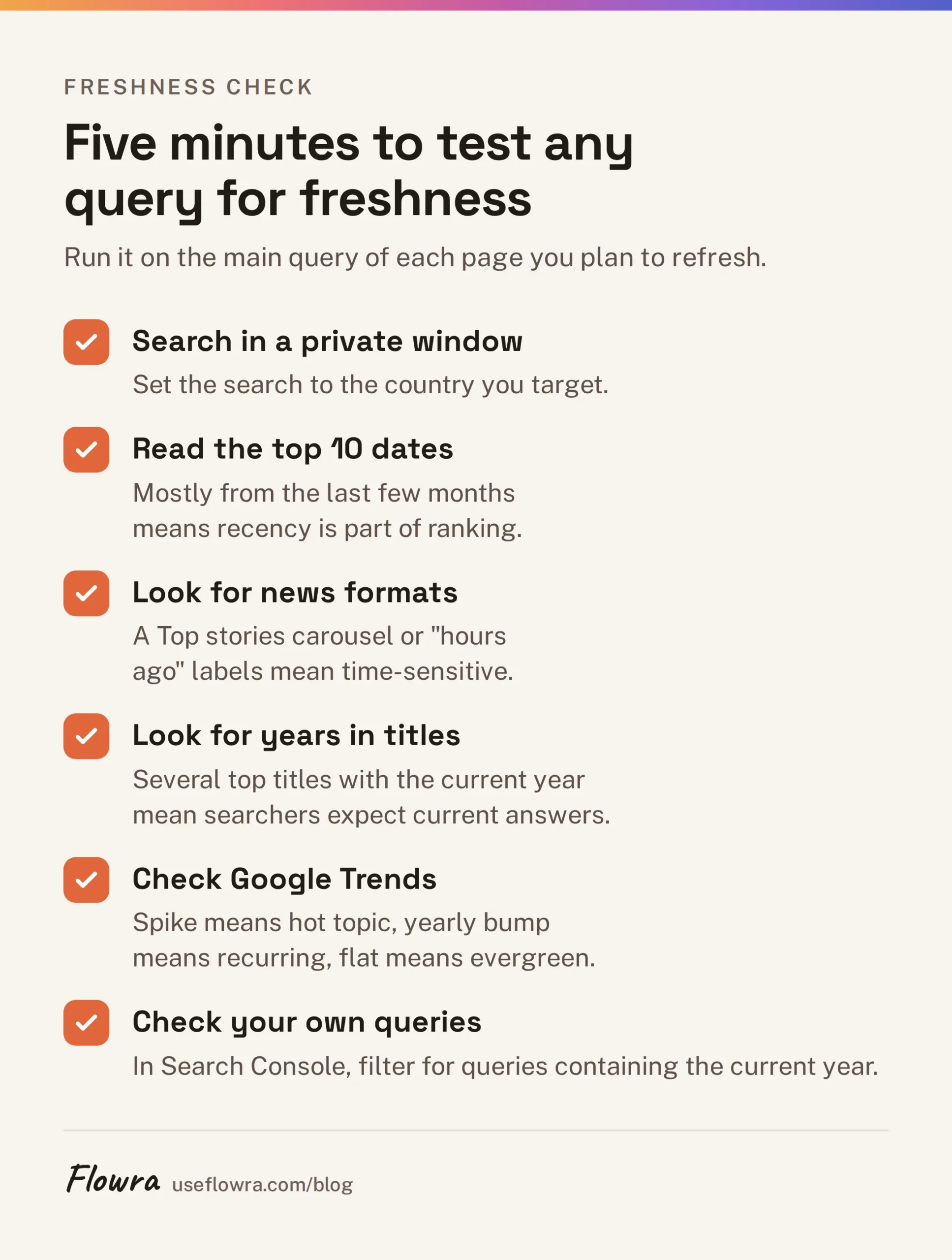
- Search it in a private window, set to the country you target.
- Read the dates on the top 10 results. Check the date in each snippet, and for pages that show none, check when the article was published. If most were published or updated in the last few months, recency is part of what ranks. If the top results span several years, it is not.
- Look for news formats. A Top stories carousel or “hours ago” labels mean Google treats the query as time-sensitive.
- Look for years in titles. If several top titles say “2026”, searchers expect a current answer.
- Check Google Trends. A sharp spike means a hot topic, a yearly bump means a recurring event, a flat line points to an evergreen search.
- Check your own queries. In Search Console, open Performance > Search results and add a Query filter for “Queries containing” the current year. That shows where your audience expects current information.
An example. Say you have “best project management tools” and “how to write a project brief”. If the top results for the first carry this year in their titles and were updated recently, your year-old list is at a real disadvantage. If the top results for the second date from 2019 to 2024, your time goes further on making that page better than on making it newer.
What the evidence shows, and what is only claimed
Most articles on fresh content mix Google’s statements with rules of thumb and present both as fact. Here they are separated.
| Claim | Evidence |
|---|---|
| Google boosts fresher pages for some queries | Confirmed in Google’s ranking systems guide. |
| Freshness matters for every search | No. Google limits it to queries where fresher content “would be expected”. |
| Publishing more often raises your rankings | Google has never said so, and no published controlled test shows it. |
| Updating pages more often raises their rankings | No controlled test of update frequency has been published. Before-and-after case studies cannot separate better content from a newer date. |
| A lower bounce rate tells Google your page is valuable | Unsourced. The articles that repeat it cite no Google statement or study. Bounce rate is a Google Analytics metric, and many sites do not run Analytics at all. |
| Refresh every 6 to 12 months | A rule of thumb with no source. The right interval depends on how fast your topic changes. |
Two fair points on the other side. A refresh that fixes outdated facts often does bring traffic back, because the page is now a better answer. And publishing more pages gives you more chances to rank for more queries. That is arithmetic, not a freshness bonus, and it only works if each page deserves to rank.
How often should you publish new content?
As often as you have something worth a page. Google gives no number, and nothing shows that a fixed schedule earns a boost.
Google’s guidance on helpful content warns against producing lots of content on many topics in the hope that some of it performs in search. A weekly post that repeats what you already published is worse than nothing: it splits clicks between two of your own pages and gives readers less reason to trust the site.
A workable rule: set your publishing pace by the number of topics where you can beat the current top results, and spend the rest of your hours keeping existing pages correct. On an established site, the pages already earning traffic usually deserve more attention than the next new post.
Should you update old content or publish new content?
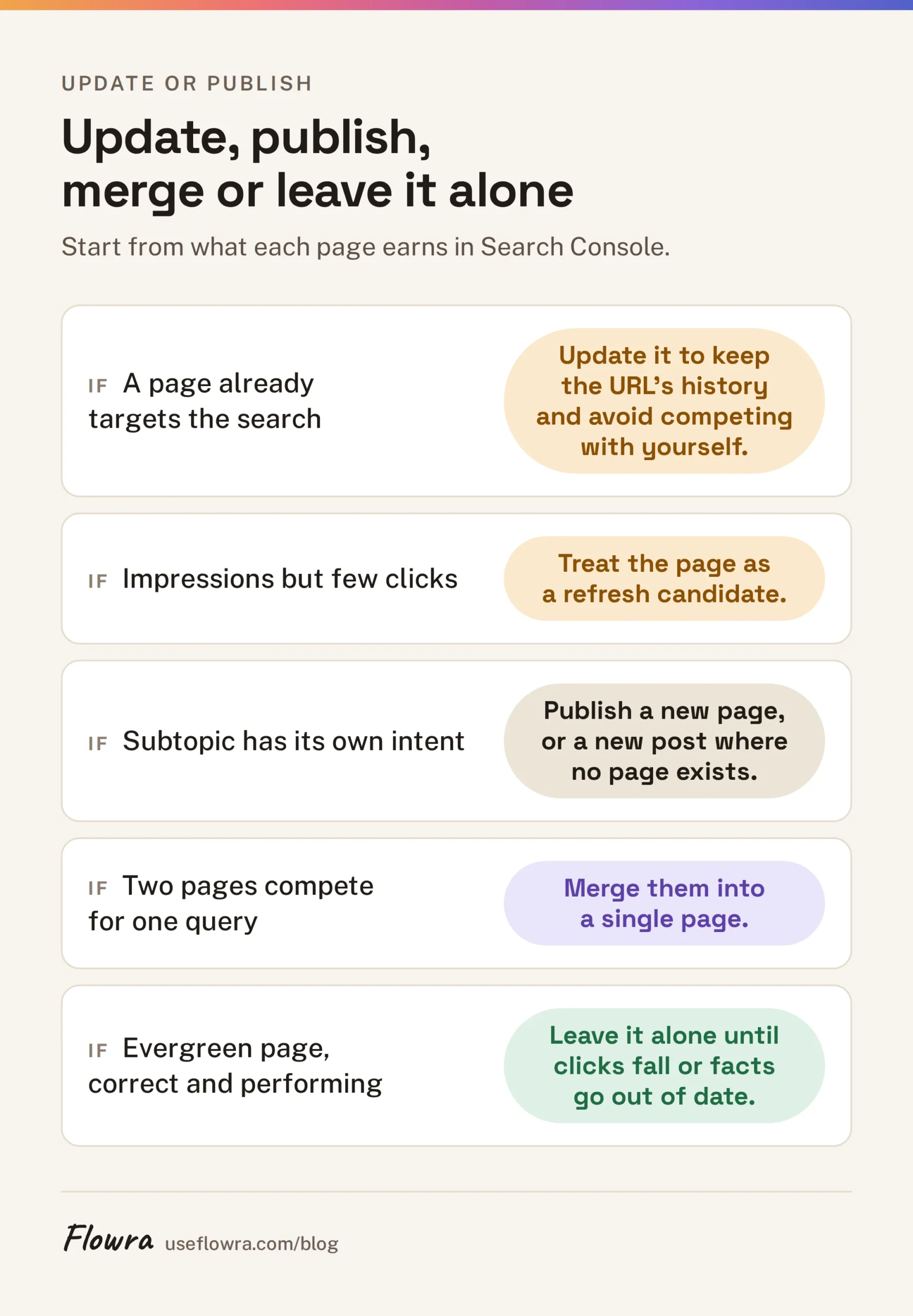
Update when a page already targets the search. Publish new when the search needs a different page.
| Situation | Do this | Why |
|---|---|---|
| The page ranks for the query but has slipped | Update it | It already has links and history. A new post would compete with it. |
| Facts, prices, screenshots or steps are out of date | Update it | Readers and Google both see the errors. |
| Searchers now want a different format (a list, not a guide) | Rewrite it on the same URL | Keep the URL’s history, change what it offers. |
| A recurring event | Update the same URL each time | A stable URL like /black-friday-deals builds up over years. A new URL each year starts from zero. |
| A subtopic with its own search intent | Publish a new page and link it from the old one | One page per intent. |
| Two of your pages rank for the same query | Merge them and redirect the weaker one | Stops them splitting clicks and links. |
| No traffic, no links, no future demand | Remove or redirect it | Refreshing a page nobody searches for wastes time. |
When unsure, look at what the page earns in Search Console. A page with impressions but few clicks is a refresh candidate. A topic with no page at all is a new-post candidate.
Does changing the publish date help?
No, and it can hurt. Google’s helpful content guidance lists changing the date of pages to make them seem fresh, when the content has not substantially changed, as a sign of content made for search engines rather than people. Its guidance on publication dates asks for a clear visible date that matches the dates in your structured data.
The real cost is trust, in three places:
- Your sitemap. Google’s sitemap documentation says it uses
<lastmod>only when the value is consistently and verifiably accurate. If a plugin bumps lastmod on every page with each deploy, Google can learn to ignore it, and your real updates lose a signal that helps them get recrawled. - Your readers. “Updated this month” above prices from 2023 tells readers the date is marketing. They leave, and they remember.
- Anyone quoting you. A date that claims currency over stale facts puts wrong information in front of people with your name on it.
When you do make a substantial change, update the modified date, show both dates (“Published March 2024, updated September 2026”), and keep datePublished and dateModified in your structured data matching what the page shows.
How often should you update content?
When the facts change, not on a calendar. Match the check to how fast the topic moves.
| Content type | When to update |
|---|---|
| News and trending topics | As the story develops, then link to newer coverage |
| Recurring events | Before each occurrence, on the same URL |
| Prices, software, “best X” lists | Whenever the products or prices change |
| Pages built on statistics | When the source publishes a new edition |
| Evergreen guides and definitions | When clicks decline, a reader flags an error, or top results cover something you do not |
The last row is where most sites waste effort. An evergreen page does not need a refresh because a year has passed. It needs one when data shows it is losing, or when it is no longer correct or complete.
Fresh content and AI Overviews
Google has published no separate freshness rule for AI Overviews. Its page on AI features and your website says there are no extra requirements to appear in them: the same SEO practices apply, and the page must be indexed and eligible to show with a snippet.
So the same logic holds. For time-sensitive queries, an out-of-date page is a poor source whether it shows as a blue link or inside a summary. For evergreen queries, there is no evidence that a recent date makes a page more likely to be cited.
What you can control is how checkable your facts are. Put the date next to numbers that change (“As of September 2026, the free tier allows 10 projects”), name the source of every statistic, and delete superseded figures instead of leaving old and new side by side. We know of no test showing this raises citations. It simply keeps any sentence that gets quoted correct.
How to refresh old content, step by step
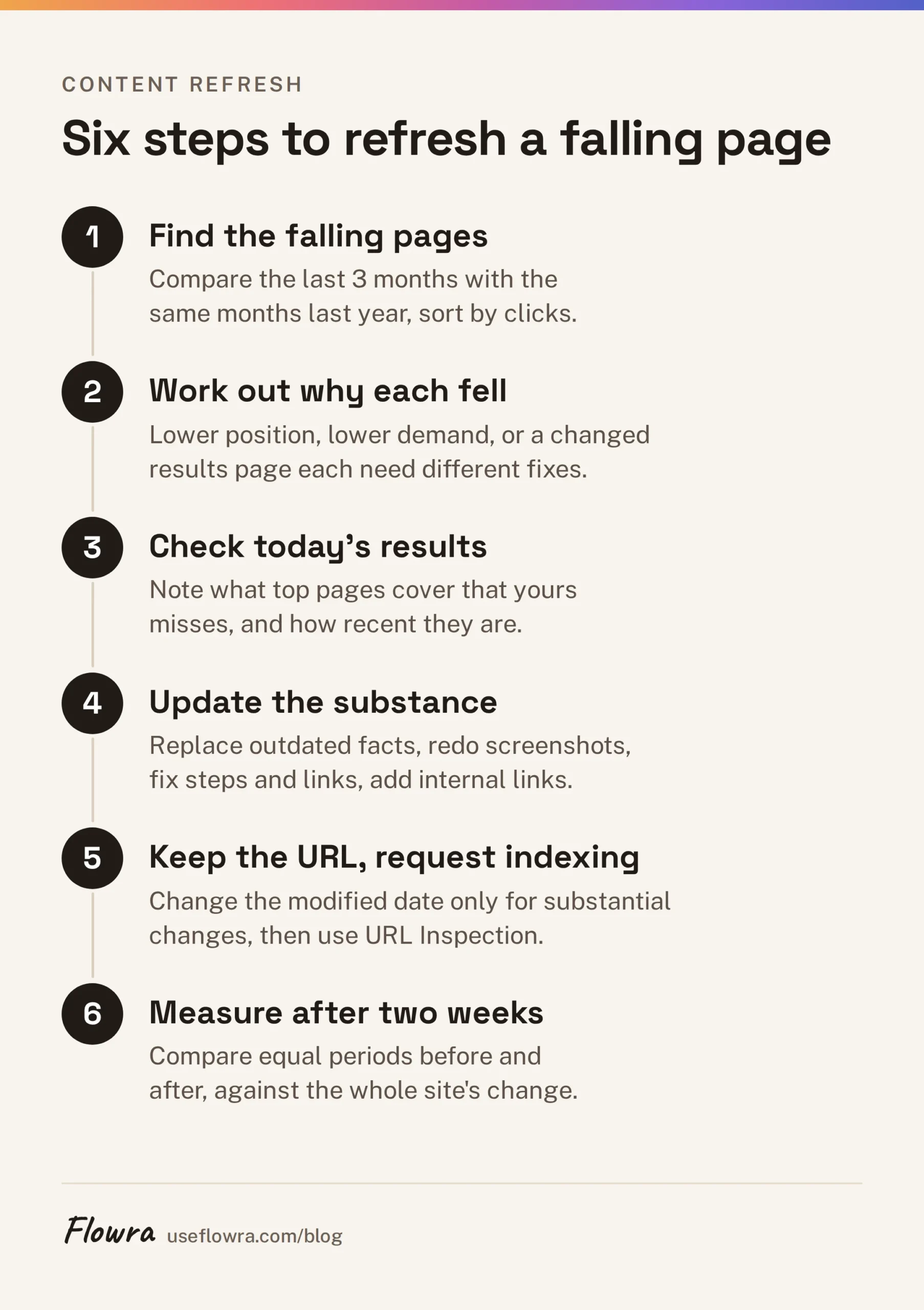
- Find the pages that are falling. In Search Console, open Performance > Search results, click the Date filter, choose Compare, and set the last 3 months against the same 3 months last year to remove seasonal swings. Open the Pages tab and sort by the clicks difference.
- Work out why each one fell. Open the page’s queries. If position dropped, other pages now answer better. If impressions fell but position held, demand fell. If clicks fell while position and impressions held, the results page changed, for example an AI Overview or featured snippet now answers above you.
- Check today’s results for the main query. Note what the top pages cover that yours does not, and whether their dates suggest the query is freshness-sensitive.
- Update the substance. Replace outdated facts and statistics (with source and year), redo screenshots, fix steps that no longer work, cut what no longer applies, add what searchers now expect, and fix broken links.
- Add internal links to the page from newer, related posts, with anchor text that describes it.
- Keep the URL, and change the modified date only if the change is substantial.
- Ask for a recrawl with URL Inspection > Request indexing. It speeds discovery but guarantees nothing.
- Measure the result. Wait about two weeks for rankings to settle, then compare clicks after the change with a period of the same length before. Compare that with the whole site’s change over the same dates, so a sitewide rise or fall does not look like your update’s effect.
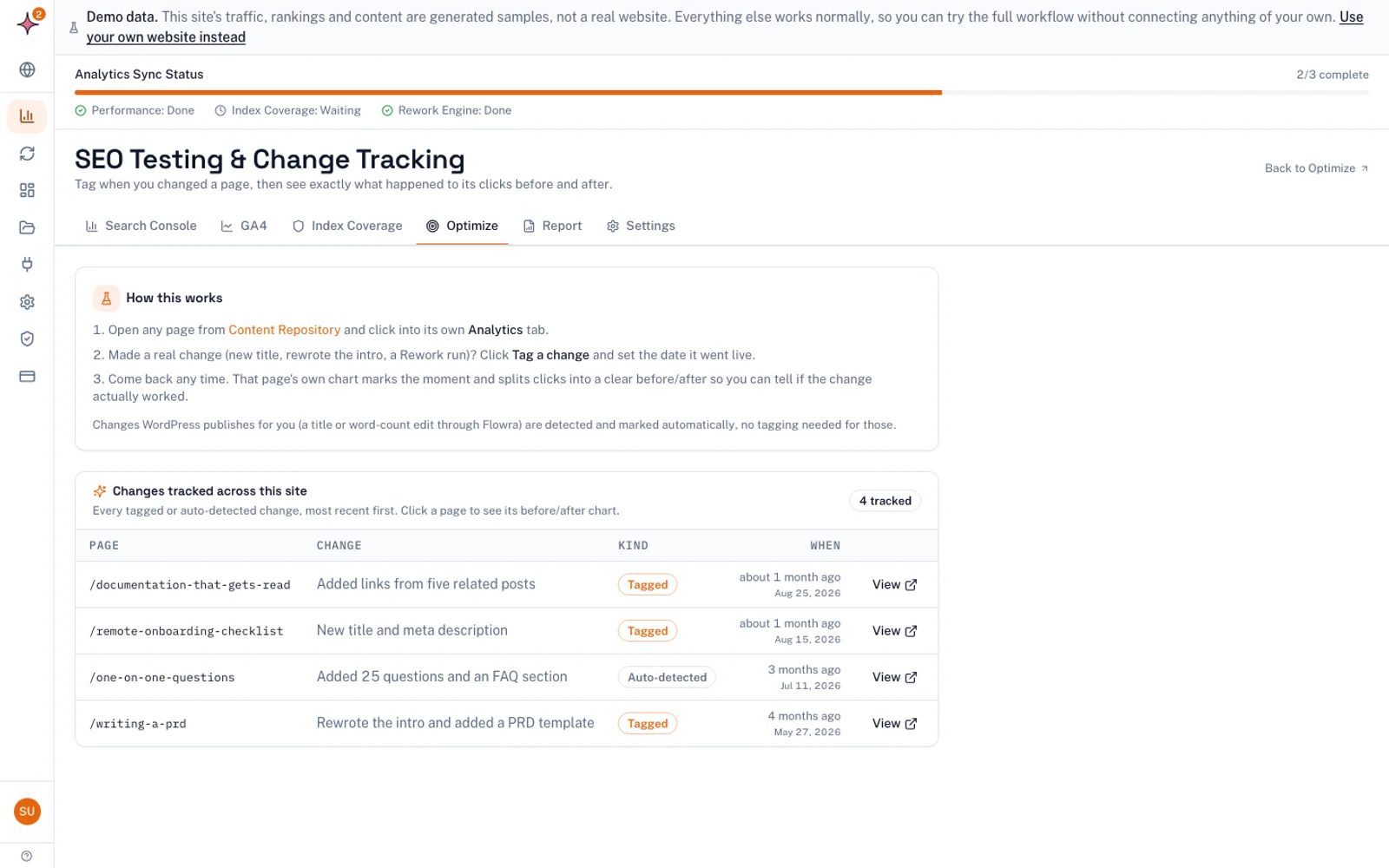
Step 8 is where most teams get sloppy. Flowra’s change tracking does the comparison: tag the change on a page and it compares before and after, with a 14 day settling window and an adjustment for the whole site’s movement. It is a before-and-after comparison, not a split test, so treat one result as a signal, not proof.
What to do next
This week, take your 20 highest-traffic pages. Run the five-minute freshness check on each page’s main query, then compare its clicks with the same period last year. Falling pages on freshness-sensitive queries go to the top of your list. Stable evergreen pages can wait.
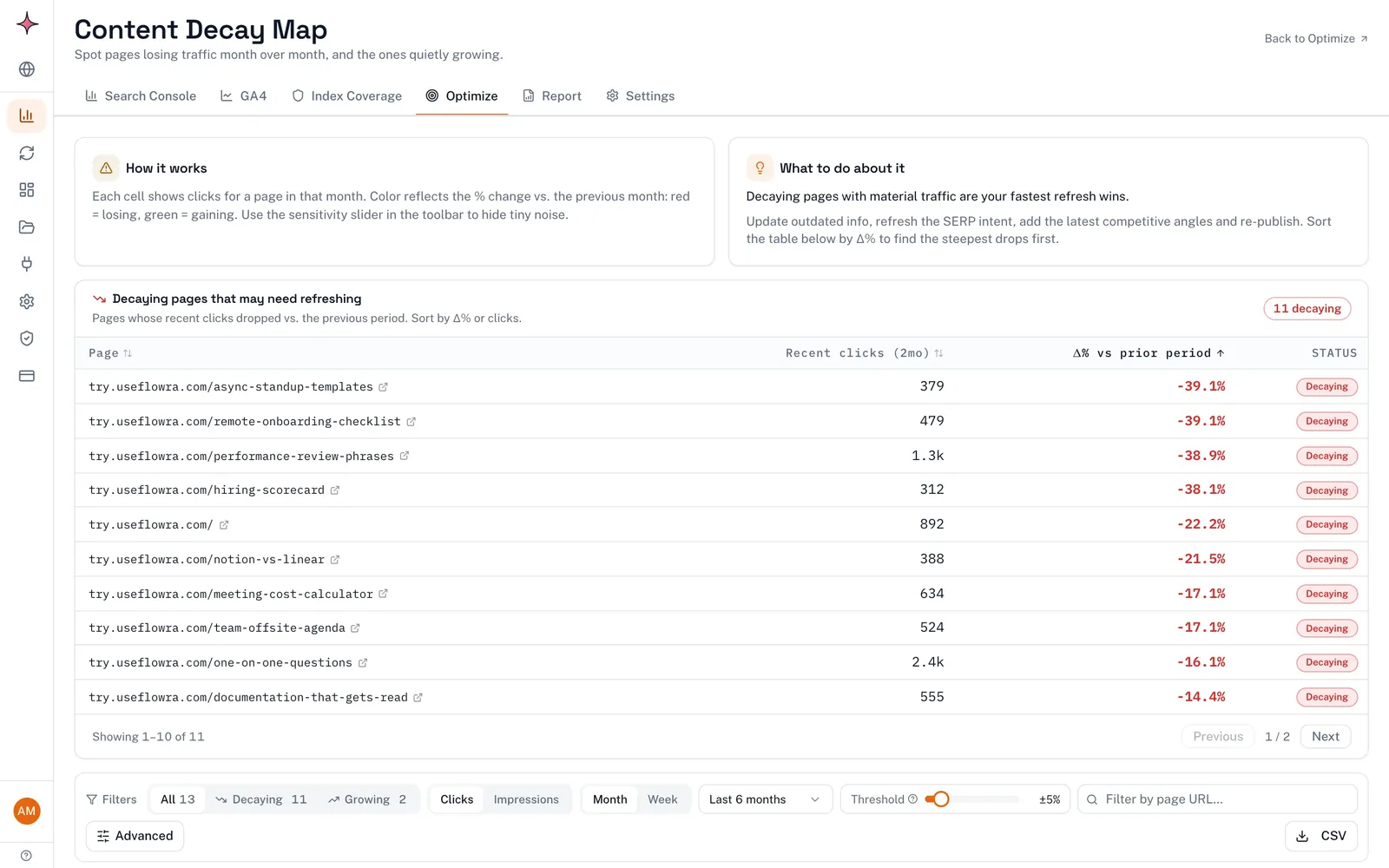
Then repeat the comparison every quarter, because decay is gradual and early fixes are cheaper. Flowra’s content decay report finds pages whose clicks and impressions are falling, from your Search Console data, and a content decay report is included in the free Flowra plan.
Frequently asked questions
Is fresh content a Google ranking factor?
Only for some searches. Google’s query deserves freshness systems give more weight to recent pages when searchers expect current information, such as news, trending topics, recurring events and fast-changing facts. For evergreen searches, a newer date gives no built-in advantage over a better older page.
What is Query Deserves Freshness?
Query Deserves Freshness (QDF) is the name for Google systems that show fresher results for queries where fresher content would be expected. Google’s ranking systems guide still lists them today. They apply to searches like reviews of a new film or news of a recent earthquake, not to stable topics.
Should I update old content or publish new content?
Update when you already have a page targeting the search, especially if it has slipped or its facts are out of date, because it keeps the URL’s history and avoids competing with yourself. Publish a new page when a subtopic has its own search intent. Merge two pages that compete for the same query.
Does changing the publish date help SEO?
No. Google’s helpful content guidance names changing a page’s date to make it seem fresh, without substantial changes, as a sign of content made for search engines. Inaccurate sitemap lastmod dates can also teach Google to ignore your dates, which slows recognition of real updates.
How often should I update content?
When the facts change or the data shows the page losing traffic, not on a fixed calendar. Price and product pages need checking whenever things change, recurring event pages before each occurrence, and evergreen guides only when they decline or become inaccurate. No study supports a universal interval such as every 6 to 12 months.
Does evergreen content need updating?
Yes, but for accuracy and to keep pace with the top results, not for a freshness boost. Review an evergreen page when its clicks fall, when a reader reports an error, or when competing pages cover things it does not. If it is still correct and still performing, leave it alone.