Keyword cannibalization is when two or more pages on your site compete for the same search. Google then keeps switching between them, or ranks neither as well as one strong page would. It is not a penalty, and it is not always a problem. It only costs you when the pages serve the same intent and the split holds both of them back.
To confirm it, filter the Search Console Performance report by the query and open the Pages tab. If two URLs both earn real impressions over time, check the intent. Then score the pages to decide which one to keep, and merge, redirect or differentiate the rest. This guide covers each step using free tools.
What is keyword cannibalization?
Cannibalization happens when Google cannot tell which of your pages best answers a query. Common causes:
- Two blog posts on the same topic, written years apart.
- A category page and a blog post that both target “running shoes for flat feet”.
- A guide and a glossary entry for the same term.
- Near-duplicate URLs created by parameters, tags or a site migration.
In the data, you see the ranking URL flipping between your pages. Or both pages sit stuck in positions 8 to 20 when one combined page could reach the top five.
Is keyword cannibalization always bad?
No. Two of your URLs on page one for the same query often just means you take up more of the results. Two pages that answer different intents, such as a pricing page and a “how it works” guide, can share a query without hurting each other.
In a September 2025 Bluesky reply, Google’s John Mueller pointed out that Search Console shows data for when pages were actually shown, and added: “IMO it’s not really “cannibalization” if it’s theoretical.” Two URLs showing up for one query is a lead, not proof. Act only when the data shows a cost:
- The ranking URL swaps back and forth, and the position drops each time it swaps.
- Neither page reaches page one, but both get impressions.
- The wrong page ranks, for example an old post instead of the page that converts.
- External links are split between two pages that say the same thing.
How to find keyword cannibalization in Google Search Console
Search Console is the most direct source, because it shows which of your URLs Google actually served for each query. If you are new to the report, start with our guide on how to use Google Search Console for SEO.
Step by step: filter by query, then open the Pages tab
- Open Search Console > Performance > Search results.
- Set the date range to Last 3 months. If the query is seasonal, use a longer range (up to 16 months).
- Tick Average position above the chart, alongside clicks and impressions.
- Click Add filter, choose Query, then Exact query, and enter the search you suspect.
- Open the Pages tab under the chart. Every URL listed has appeared in results for that query.
- Note each URL’s clicks, impressions and position from the table.
- To see whether they swap, add a second filter: Page > Exact URL for the first URL, and read the position line over time. Repeat for the second URL. If one page’s impressions rise in the same weeks the other’s fall, Google is probably switching between them.
To audit many queries at once, work the other way round. Export the Queries tab for each important page, put the exports side by side, and look for queries that appear for more than one URL.
When are shared impressions worth acting on?
Google gives no threshold. This is our own working rule, not an official number. Treat a query as a real candidate when all of these are true:

- The second URL gets at least 20% as many impressions for that query as the first.
- Both URLs get impressions in most weeks of the range, not just on one stray day.
- At least one URL ranks inside the top 20, so there is a page-one spot to win.
- The query matters to you: it has enough impressions to move traffic, or it leads to sales.
A URL with a dozen impressions next to one with thousands is noise. Leave it alone.
Two traps in the Search Console data
Queries and pages are counted differently. Google says data grouped by Queries is aggregated by property, while data grouped by Pages is aggregated by page. So when two of your pages appear in the same results, the query total counts that search once, but each page counts its own impression. If the impressions on the Pages tab add up to more than the query total, both pages were often shown together. That can be a healthy double listing, not a swap.
Average position means two things. In the chart, average position is the position of the topmost result from your entire site; in the table it is per URL. The chart can say 4 while the table shows one page at 6 and the other at 9. For cannibalization work, read the table.
Check the intent before you call it cannibalization
Search the query in a private window and look at what ranks. Then compare it with your two pages:
- Same intent, similar content: real cannibalization. Go on to choose a keeper.
- Different intents (one explains and one sells, or one is for beginners and one for experts): usually fine. Make the difference clearer and keep both.
- Both of your pages on page one together: probably working in your favour. Keep an eye on it, but do not merge.
Other ways to spot it: site: search and rank trackers
A site: search. Type site:yourdomain.com "questions to ask your manager" into Google. This lists indexed pages on your site that mention the phrase. The order is not a ranking, but it quickly shows how many pages target the topic, including old ones you forgot about. Run one before you write a new page, too.
A rank tracker. If your tracker records the ranking URL as well as the position, look for the URL changing from week to week for the same keyword. A position that drops each time the URL changes is the classic pattern. Rank trackers check from one location and device, so confirm in Search Console, which reflects real searches.
Skip the spreadsheet
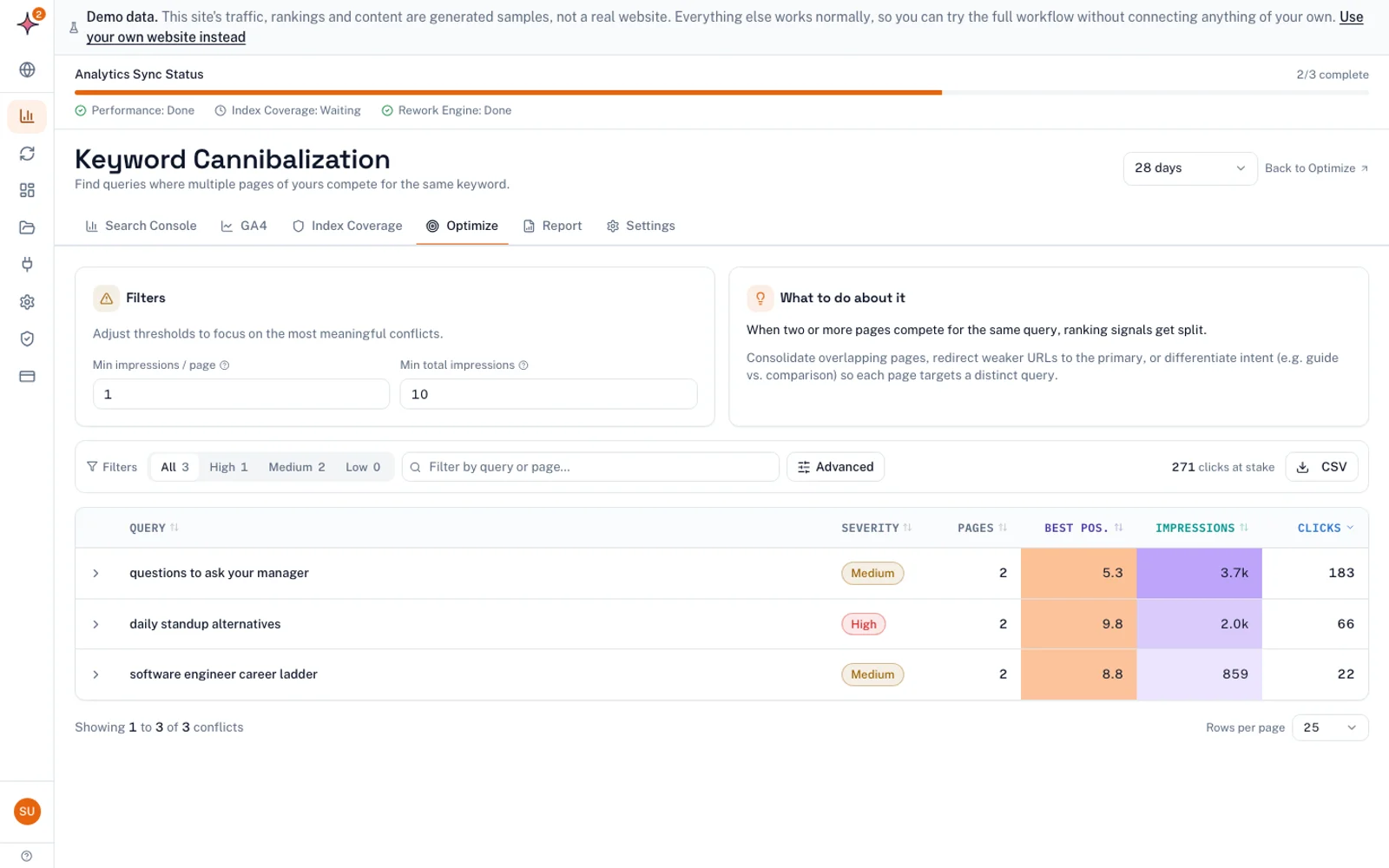
The manual method works, but you have to repeat it one query at a time. The free keyword cannibalization checker runs in your browser with no sign-up. It reads your Search Console query and page data and lists searches split across two or more pages, with a severity rating and the page to keep.
To skip exports altogether, connect Search Console to Flowra (there is a Free plan). The Keyword Cannibalization report itself is part of the Pro plan. The Free plan covers basic reports: content decay and the top 5 striking distance queries. On Starter and above, the same connection feeds the SEO monitoring dashboard, with 16 months of Search Console and GA4 history.
How to choose which page to keep
Do not keep the newest page by default, or the one you like best. Score both pages on the evidence. Give each page 0, 1 or 2 points per factor, then multiply by the weight.
| Factor | Where to check | 0 points | 1 point | 2 points | Weight |
|---|---|---|---|---|---|
| External links | Search Console > Links > External links > Top linked pages, or your backlink tool | Clearly fewer than the other page | About the same | Clearly more | x3 |
| Clicks from all queries, last 12 months | Performance, Pages tab, no query filter | Clearly fewer | Within about 20% | Clearly more | x3 |
| Position for this query | Performance, query filter, Pages tab | Worse than 20 | 11 to 20 | 1 to 10 | x2 |
| Intent fit | Compare with what ranks for the query | Different intent | Partly fits | Matches what ranks | x2 |
| Content quality | Read both pages | Thin or out of date | Adequate | Complete and current | x1 |
The maximum score is 22. Links and total traffic carry the most weight because they are the hardest to rebuild. Content you can always copy across. If the scores are tied, compare conversions in GA4, then pick the cleaner URL.
A worked example
This case is made up for illustration, not real data. A site has two posts on one query:
- Page A: /blog/questions-to-ask-your-manager. Older, linked from many more external sites, position 7.8 for the query, and uses the list format that ranks, but parts are out of date.
- Page B: /blog/one-on-one-meeting-questions. Newer, few external links, position 14, similar total clicks. Better written, with a section on remote teams.
| Factor | Page A | Page B |
|---|---|---|
| External links (x3) | 2 x 3 = 6 | 0 x 3 = 0 |
| Clicks, all queries (x3) | 1 x 3 = 3 | 1 x 3 = 3 |
| Position for query (x2) | 2 x 2 = 4 | 1 x 2 = 2 |
| Intent fit (x2) | 2 x 2 = 4 | 1 x 2 = 2 |
| Content quality (x1) | 1 x 1 = 1 | 2 x 1 = 2 |
| Total | 18 | 9 |
Keep Page A. Move Page B’s best material, including the remote teams section, into Page A, then redirect B to A. If the totals are within about three points of each other, the pages are evenly matched. In that case, check whether they could serve different intents before you merge them.
How to fix keyword cannibalization
| Fix | Use it when | What happens to the other page |
|---|---|---|
| Merge and 301 redirect | Same intent, and you do not need the weaker page | Its best content moves to the keeper, and its URL redirects there |
| Canonical tag | Both URLs must stay live, and the pages are duplicates or near duplicates | It stays live and points Google to the keeper |
| Make the pages distinct | The two pages can serve different intents | Each is rewritten around its own query and angle |
| Fix internal links | Always, alongside any other fix | Links that use the target term point to the keeper |
| Noindex | Not a cannibalization fix (see below) | It drops out of the index without passing signals on |
Steps for a merge and redirect
- Copy anything useful from the weaker page into the keeper: sections, examples, FAQs and images.
- Add a 301 redirect from the weaker URL to the keeper.
- Update internal links across the site so they point straight at the keeper, not through the redirect.
- Remove the redirected URL from your XML sitemap.
- In Search Console, run URL Inspection on the keeper and click Request indexing.
- Wait a few weeks, then compare clicks and position for the query before and after.
For step 6, you can tag the change in Flowra. It compares the period before and after the change, with a 14 day settling window and an adjustment for movement across the whole site. It is a before-and-after comparison, not a split test, and it will report “This change hurt” just as readily as “This change helped”.
301 redirect or canonical tag?
Google treats both redirects and rel=”canonical” as “a strong signal” that the target should become the canonical URL. The difference is what visitors see. A redirect sends people to the keeper. A canonical leaves both pages reachable.
Choose the redirect when the weaker page has no reason to exist on its own. Choose the canonical when both pages must stay live and say nearly the same thing, such as a campaign landing page that copies an evergreen page. If the two pages genuinely differ, a canonical is the wrong tool: make them distinct instead.
Do not use robots.txt to choose between them. Google says plainly: “Don’t use the robots.txt file for canonicalization purposes”.
Why noindex is the wrong fix
Many guides list noindex as a standard fix. Google disagrees: “We don’t recommend using noindex to prevent selection of a canonical page within a single site”, and it prefers rel=”canonical”. A noindexed page drops out of results, but it does not pass its signals on to your keeper.
The same logic applies to “de-optimizing” the weaker page by stripping out the keyword. That weakens one page without strengthening the other. Merge, redirect or differentiate instead. Save noindex for pages that should never appear in search at all, such as thank-you pages or internal search results.
Internal links: the quiet fix
Internal links tell Google which page you consider the main one. After you choose a keeper:
- Find anchor text that uses the target query and point those links at the keeper.
- If you keep the weaker page, link from it to the keeper using the target term.
- Add a link to the keeper from your pillar or hub page for the topic.
Prevent it with a keyword map
A keyword map is a spreadsheet with one row per page and one primary query per row. These columns work well:
| Primary query | Intent | URL | Secondary queries | Status |
|---|---|---|---|---|
| questions to ask your manager | List, informational | /blog/questions-to-ask-your-manager | one on one questions, 1:1 questions | Live |
| one on one meeting template | Template, download | /templates/one-on-one | 1:1 agenda template | Planned |
Before anyone writes a new page, search the map for the query and run the site: search described above. If a page already owns the query, update that page instead of writing a new one. Every quarter, rerun the Search Console check on your top queries, because Google sometimes pairs up pages you never meant to compete.
What to do next
Pick your five most valuable queries. Run each one through the Search Console steps above, apply the 20% rule and the intent check, and write down any real splits. Score each pair with the rubric. Then fix the worst split first: merge, redirect, update internal links and request indexing. Put a reminder in your calendar four weeks out to check the result.
Frequently asked questions
Is keyword cannibalization a Google penalty?
No. Google does not penalize a site for having several pages on one topic. The cost is indirect: Google may switch between your pages or rank neither of them well, and links and clicks end up split across them. Fixing it is about consolidating strength, not lifting a penalty.
How do I find keyword cannibalization in Google Search Console?
Go to Performance > Search results, add a Query filter with the exact search, and open the Pages tab. If two or more URLs get meaningful impressions across most of the period, filter by each URL and compare their positions over time. Then check the live results to confirm both pages serve the same intent.
Should I use a 301 redirect or a canonical tag?
Use a 301 redirect when the weaker page does not need to stay live, because it sends both visitors and Google to the keeper. Use a canonical tag when both URLs must stay reachable and the pages are near duplicates. Google treats both as strong signals when it chooses the canonical URL.
Can I use noindex to fix keyword cannibalization?
It is not recommended. Google’s documentation says it does not recommend noindex for stopping a page from being chosen as canonical within one site, and it prefers rel=”canonical”. A noindexed page leaves the index without passing its signals to the page you want to rank.
Which page should I keep?
Keep the page with the stronger evidence: more external links, more clicks across all its queries, a better position for the query, and a closer fit with what Google ranks. Content quality matters less, because you can move the better content into the keeper. Score both pages and keep the one with the higher total.
Does keyword overlap in Google Ads work the same way?
Not quite. In Google Ads, overlapping keywords in your own account decide which of your keywords and ads shows for a search. They do not split organic rankings. The fix is different too: check the Search terms report and use negative keywords to send each search to the ad group you want.