To explain an SEO traffic drop to a client, find the cause first. Tell the client before they notice it, then show the evidence on one screen: what dropped, why, and what you will do next. Clients rarely leave over a drop. They leave over surprises and vague answers that sound like excuses.
This guide covers three things. First, a five-step diagnosis you can run in Search Console and GA4 in an afternoon. Second, how to run the conversation. Third, scripts for each cause, including the one most guides skip: a drop your own team caused.
Tell the client before they notice
If the client spots the drop in their own analytics before you mention it, you start the conversation on the back foot. Send a short holding message the day you see the drop, before you know the cause.
Script 1: the holding message
Hi Sam, a quick heads-up. Organic clicks to the site fell about 20% over the last two weeks compared with the two weeks before. We’re checking tracking, seasonality and recent Google changes now. You’ll have the cause and our plan by Thursday. No action needed from you yet.
This message works for three reasons. It gives one number, it lists what you are checking, and it sets a deadline you can keep. Don’t guess at a cause. If your guess turns out wrong, you lose more trust than the drop cost you.
Good regular reporting means you rarely need this message. If a client first sees a drop in your monthly report, the report is doing its job. Our guide to seo reports for clients covers how to set that up.
Step 1: Confirm the drop is real
Before you explain anything, rule out broken tracking. Compare the two sources:
- In Search Console, open Performance > Search results and note the clicks for the period.
- In GA4, open Reports > Acquisition > Traffic acquisition and filter to Organic Search sessions for the same dates.
- Compare the trend lines, not the totals. The two never match exactly, but they should move together.
If GA4 dropped and Search Console didn’t, you have a tracking problem, not an SEO problem. Common causes are a new cookie consent banner, a tag removed during a site update, or a change to the GA4 property. That is a much easier conversation. Fix the tracking, annotate the gap and tell the client their real traffic held.
Step 2: Rule out seasonality with year-over-year data
Google’s own guide to debugging search traffic drops recommends viewing the “Last 16 months” of data and comparing the last 3 months with the same period a year earlier. You do that in Search Console under Performance > Date > Compare.
If the same dip happened at the same time last year, you have your answer. Back it up with Google Trends: enter the client’s two or three main topics, set the range to five years and look for the same yearly pattern. A Trends chart showing the whole market dipping every August is strong evidence. Clients can check it for themselves, so they tend to believe it.
Step 3: Check the scope: one section or the whole site
A drop across every page points to something site-wide: a Google update, a technical change or a shift in the market. A drop in one place points to something local.
In Search Console Performance, check these in turn:
- Pages tab: sort by click difference. Is the loss spread out, or are five URLs causing most of it?
- Page filter: use “URL contains” with
/blog/,/products/or other folders to compare sections. - Countries and Devices tabs: a drop in one country, or on mobile only, narrows the cause quickly.
- Queries tab: check whether branded searches fell too. Fewer brand searches usually means less demand for the business, not an SEO issue.
For a fuller walkthrough of each cause, see why did my organic traffic drop.
Step 4: Check for Google updates and technical changes
Google’s debugging guide lists six causes of search traffic drops: algorithm updates, technical issues, security issues, spam (manual actions), seasonality or changing interests, and site moves. Work through the ones you haven’t ruled out yet:
- Algorithm updates: look on the Google Search Status Dashboard for updates that line up with the date the drop started.
- Manual actions and security: open Security & Manual actions in Search Console. Both reports should say no issues were detected.
- Indexing: open Indexing > Pages and look for a jump in “Not indexed” pages. Run URL Inspection on the pages that lost the most.
- Recent changes: ask your developers and the client what changed in the week before the drop. Common culprits are redesigns, URL changes, a
noindexleft on after staging and edits to robots.txt.
Write down the date the drop started before you do any of this. Each possible cause happened either before that date or after it, which rules it in or out.
Step 5: Rankings stable but clicks down? Separate AI Overviews from lower demand
Many agencies now blame every drop on AI Overviews. Some drops are caused by them. Others come from people simply searching less. Search Console can tell the two apart if you read clicks, impressions and position together:
| What you see in Search Console | Most likely cause | How to confirm |
|---|---|---|
| Position steady, impressions steady or up, clicks and CTR down | Fewer clicks per search (AI Overviews, other SERP features) | Search the top losing queries yourself and note what appears above your result |
| Position steady, impressions down, CTR steady | Fewer people searching | Google Trends shows the same decline for those topics |
| Position down, impressions down | Ranking loss (update, competitor, technical issue) | Check the update dates and the indexing report |
| Search Console steady, GA4 down | Tracking problem | Compare tags and consent settings |
Search Console does not report AI Overview clicks separately, so treat the first row as a strong pointer, not proof. Tell the client that. “Your rankings held, but fewer searchers click through on these 30 queries. Here’s what the results page looks like now” is honest. “It’s AI” with no evidence sounds like an excuse.
What to put on screen and who should be on the call
Keep the call to two people from your side: the account lead, who owns the relationship, and the person who ran the diagnosis, who can answer the hard questions. Bringing in a senior person only for bad news makes it feel like a crisis.
Put four things on screen, in this order:
- The drop: one clicks chart with the year-ago line underneath it.
- The evidence: the single chart or table that shows the cause (the Trends line, the update date, the CTR table).
- The business view: organic leads or sales for the same period.
- The plan: what you will do, when you will check again, and what would change your mind.
Scripts by cause
Swap in your own numbers and names. Each script states the cause, shows the proof and says what happens next.
Script 2: seasonal dip or lower demand
Clicks fell 18% this month, but they fell 16% over the same weeks last year, and Google Trends shows searches for [topic] down across the market. Our rankings held. We expect this to recover as demand returns in [month], and we’ll use the quiet period to update the [section] pages before the busy season.
Script 3: Google update
Google released a [core] update on [date], and our clicks started falling two days later. The drop is concentrated in [section], where [competitor type] now ranks above us. Updates reward pages that answer the search better, so we’re reworking the 10 pages that lost the most. We’ll review progress on [date]. We can’t promise rankings come back after an update, but these are the changes most likely to help.
Script 4: fewer clicks per search
Our positions on these 30 queries are unchanged, and searches are steady, but fewer people click. Google now shows an AI summary above the results for most of them. Leads from organic held at [number]. We’re shifting effort to the queries where people still click and to pages that drive enquiries.
Script 5: a mistake we made
Agencies most want to hide this kind of drop, and it’s the one where honesty matters most.
On [date] our migration left 140 old URLs without redirects, and those pages dropped out of Google. That was our error. We fixed the redirects on [date] and asked Google to recrawl the key pages. Google’s site move guidance says it can take a few weeks for most pages of a site this size to update in its index, so we’ll report progress every Friday until clicks recover. There’s no charge for this work.
Name the error, the fix and the date. Don’t soften it into “some technical factors”. The client will find out eventually, and how you handle it now decides whether they stay.
Report business results, not just traffic
Does a traffic drop matter if conversions held? Often it doesn’t. Informational blog posts can lose a lot of clicks while the pages that bring in leads hold steady. Check this in GA4: filter Organic Search sessions by landing page and compare key events (conversions) year over year.
If leads held, open with that, and show traffic as a supporting number rather than the headline. Report organic conversions, leads or revenue first, then clicks, then rankings. Agree that order with the client while things are going well, not in the middle of a drop.
Should you report AI visibility?
If the client asks about AI search, track four things for a fixed list of 20 to 50 prompts in ChatGPT, Perplexity and Google:
- Visibility: does the brand appear at all?
- Position: is it mentioned first, or buried?
- Citations: is the client’s site linked as a source?
- Sentiment: is the mention positive, neutral or negative?
AI answers change from one run to the next, so present this as a sample, not a ranking. Put AI referral visits from GA4 next to it. Those are real visits you can count, although they miss answers that never sent a click.
You can charge for this if it’s genuine recurring work and the client understands its limits. Sell it as monitoring, not as a guaranteed position.
How long until traffic recovers?
Don’t give a date you can’t control. Google’s debugging guide says “there’s no guarantee that changes you make to your website will result in noticeable impact in search results”. It adds that some changes take effect in a few days and others could take several months. Promise a check-in schedule, not a recovery date. Every script above follows that rule.

A realistic timeline to give clients:
- Tracking fixes: your reports are correct again from the day of the fix. GA4 data lost during the gap does not come back.
- Site moves and URL errors: Google’s site move guide says a small to medium-sized website “can take a few weeks for most pages to move”.
- Content changes after a core update: Google’s core updates guidance says that if a few months pass with no effect, “that could mean waiting until the next core update.”
- Seasonality: it ends when demand returns.
Skip the spreadsheet next time
The manual method above works, but you have to export Search Console and GA4 every time a client asks a question. If you’d rather skip the spreadsheet, Flowra connects to the client’s Search Console and GA4, and the Free plan includes a content decay report that lists the pages losing clicks.
It also builds a weekly report from Search Console and GA4 that explains what moved in plain language. You add your own lines about the work you did. On Starter and above you can share it as a link with your agency’s name, logo and colour, and on the Agency plan it becomes a fully white label seo report.
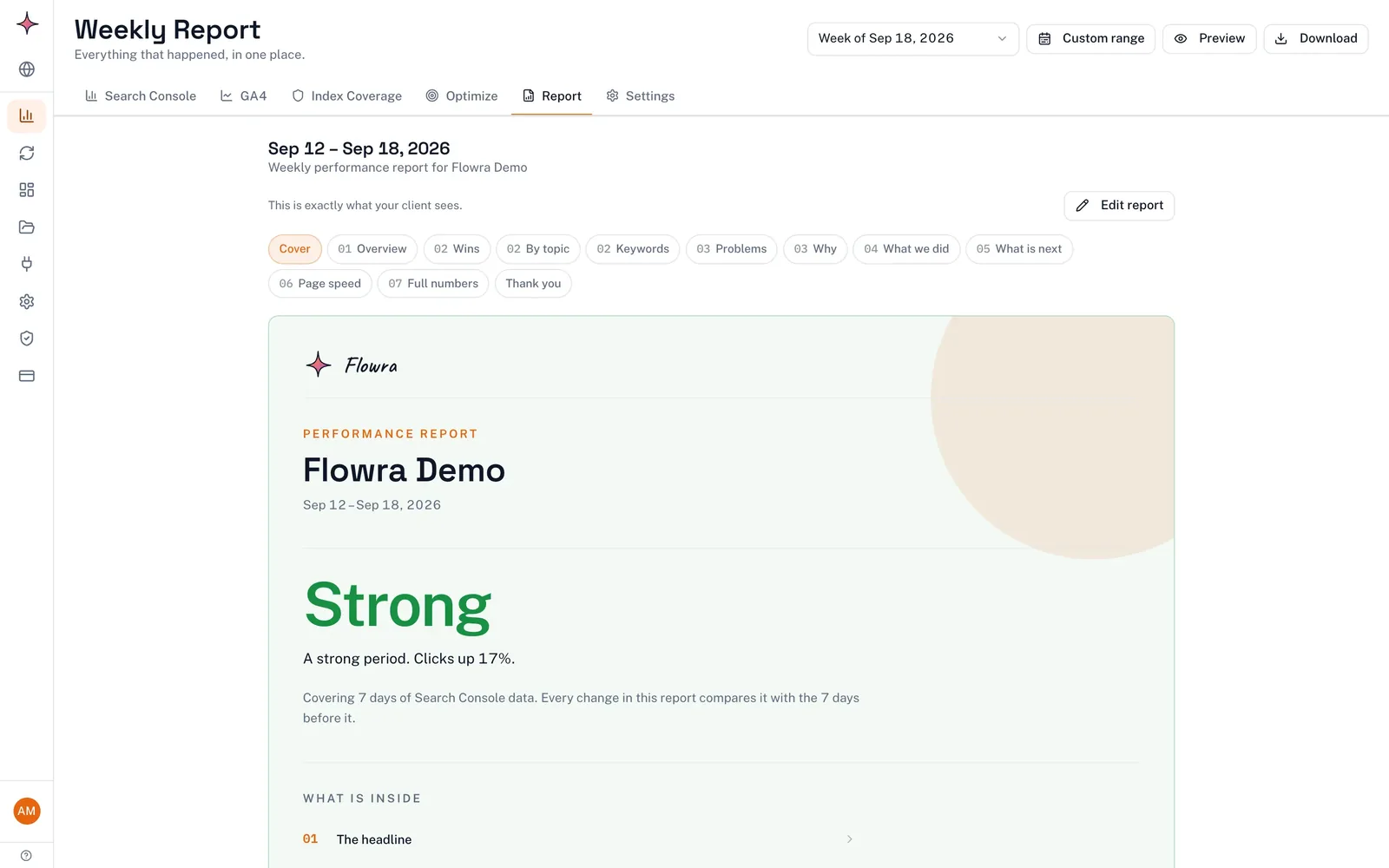
After you fix something, tag the change in Flowra to get a before-and-after verdict, including “Probably hurt” when that’s what the data shows. You still check manual actions, security and indexing by hand.
Frequently asked questions
Is it an algorithm update, a seasonal dip, or broken tracking?
Check tracking first: if GA4 organic sessions fell but Search Console clicks didn’t, the problem is tracking. Next, compare the same period last year in Search Console and check Google Trends for seasonality. If neither explains the drop, match its start date against the Google Search Status Dashboard.
Why are rankings stable but traffic is down?
Either fewer people are searching or fewer searchers click. If impressions fell too, demand dropped, and Google Trends can confirm that. If impressions held but CTR fell, something on the results page, often an AI Overview, answers the search before people reach your link.
Does a traffic drop matter if conversions held?
Usually much less than it looks. Lost clicks often come from informational pages that rarely convert. Check organic key events by landing page in GA4, and if leads held, open your report with that.
How long until traffic recovers?
There’s no reliable timeline, and Google’s debugging guide says changes don’t guarantee a noticeable impact. After a site move, Google says most pages of a small to medium-sized site can take a few weeks to move in its index. Give clients a check-in schedule rather than a recovery date.
How do I stop the client leaving after rankings drop?
Tell them before they notice, explain the cause with evidence and own any mistake your team made. Show business results next to traffic, and share a plan with dates you can keep. Vague explanations lose clients faster than the drop itself.