SEO KPIs are the few search numbers you tie directly to a business result, such as leads, sales or calls from organic search. Everything else in Search Console and GA4 is a metric. Metrics help you find problems, but they do not prove that SEO is working.
Most SEO reports for clients need only six KPIs: organic conversions and their value, non-branded organic clicks, impressions for priority topics, priority queries on page one, visits from AI assistants, and SEO ROI each quarter. This page covers the full list, the short client set, and how to explain each one to someone who is not an SEO. It also includes a report template and a dashboard template you can copy.
What are SEO KPIs, and how is a KPI different from a metric?
A metric is any number you can measure. A KPI is a metric that you and the client agree, in advance, to judge the work by, because it moves with something the business cares about.
“Impressions” is a metric. “Impressions for our ten service pages, up on the same quarter last year, because those pages produce our leads” is a KPI.
A metric becomes a KPI when it passes four checks:
- It is tied to a goal the client has stated, such as more demo requests, more online sales or more booked jobs.
- SEO work can move it. Total revenue is not an SEO KPI because too much else affects it. Revenue from organic search is.
- It has a direction or target, agreed before the work starts.
- You measure it the same way every period, with the same filters, date comparison and source.
| Metric | The KPI version |
|---|---|
| Organic sessions | Organic sessions to product pages, against the same month last year |
| Keyword rankings | How many of 25 priority queries rank on page one |
| Form submissions | Organic leads per month, target 30 by the end of Q2 |
| Impressions | Non-branded impressions for the “pricing” and “comparison” topics |
The full list of KPIs for SEO, and who should see each one
These are the KPIs for SEO that most lists include. The useful part is the last column: some KPIs belong in front of the client, and some belong on your team’s dashboard.
| KPI | What it answers | Where to get it | Who sees it |
|---|---|---|---|
| Organic traffic | Are more people arriving from search? | Search Console clicks, GA4 Organic Search sessions | Client (as non-branded clicks) |
| Keyword rankings | Where do we appear for queries that matter? | Search Console average position; Semrush, Ahrefs or Moz for tracked positions | Team, with a summary for the client |
| Organic CTR | Do searchers choose our result when they see it? | Search Console | Team |
| Organic conversions and leads | Is search producing business? | GA4 key events, the client’s CRM | Client |
| Branded vs non-branded traffic | Are we reaching new people, or people who already know the name? | Search Console with a query filter | Client |
| Search visibility | How often do we appear for our topics? | Search Console impressions; visibility scores in third-party tools | Client |
| Backlinks | Are other sites referring to us? | Ahrefs, Semrush or Moz; Search Console’s Links report | Team |
| Google Business Profile metrics | Are local searchers calling, asking for directions, visiting the site? | The Performance view in Google Business Profile | Client (local businesses) |
| Core Web Vitals | Is the site fast and stable for real visitors? | Search Console’s Core Web Vitals report, PageSpeed Insights | Team |
| Engagement | Do search visitors do anything once they arrive? | GA4 engagement rate and engaged sessions | Team |
| AI assistant referrals | Are ChatGPT and similar tools sending visitors? | GA4 session source | Client |
| SEO ROI | Is the work paying for itself? | GA4, CRM and the cost of the work | Client, quarterly |
A few of these need tighter definitions than they usually get.
Organic traffic. In Search Console, organic traffic means clicks from Google’s search results to your site. In GA4, it means sessions whose default channel group is Organic Search, which also includes Bing, DuckDuckGo and other engines. The two numbers never match, so pick one per report and say which one you used.
Core Web Vitals. There are three: LCP (loading), INP (responsiveness) and CLS (visual stability). INP has replaced First Input Delay. Google counts LCP within 2.5 seconds, INP within 200 milliseconds and CLS under 0.1 as good, according to its Core Web Vitals documentation. Any article that calls INP “upcoming” is out of date.
Engagement. GA4 reports engagement rate as the headline figure. Its bounce rate is simply the share of sessions that were not engaged. If a list still treats bounce rate as a core KPI, it was written for Universal Analytics, which Google has retired.
Data sources. Search Console and GA4 come free from Google, so they are your source of truth for clicks, impressions and conversions. Semrush, Ahrefs and Moz estimate rankings, visibility and backlinks from their own crawls. Use them for competitor and link data that Google does not provide, and treat their traffic figures as estimates.
The short set: 6 SEO KPIs to put in front of a client
Most published lists run well past what a client can use. A client can keep about six numbers in mind. These six answer the questions clients actually ask: “Is it bringing in business? Are new people finding us? Is it getting better?”
- Organic conversions and their value. Leads, sales, bookings or calls from organic search, and what they are worth. Say it as: “How much business came from people who found us on Google.”
- Non-branded organic clicks. Clicks from searches that do not include the brand name. Say it as: “New people finding us without already knowing our name.”
- Impressions for priority topics. How often the site appeared in results for the topics you are working on. Say it as: “How often we showed up for the things you sell.” This KPI moves first, often weeks before clicks.
- Priority queries on page one. Out of an agreed list of queries, how many rank in the top 10. Say it as: “Of the 25 searches we care about most, 14 now put us on the first page.”
- AI assistant referrals. Visits from ChatGPT, Perplexity, Gemini, Copilot and Claude. Say it as: “People who asked an AI tool and clicked through to us.”
- SEO ROI, quarterly. Value from organic search against the cost of the work. Say it as: “For every dollar spent on SEO, this much came back.”
Everything else in the full list goes on your team dashboard or in an appendix at the back of the report. For a local business, swap number 4 for Google Business Profile calls and direction requests.
How to split branded from non-branded traffic
- In Search Console, go to Performance > Search results.
- Click Add filter > Query and choose Custom (regex).
- Set it to Doesn’t match regex and enter the brand and its misspellings, for example
(?i)acme|akme|acme co.
Search Console does not save filters. Once the filter is applied, bookmark the report URL, because the URL keeps the filter. You can also keep the regex in your report template and paste it in each month. Either way, the numbers stay consistent from month to month.
Are keyword rankings still important in 2026?
Yes, but as a diagnostic, not as proof of value. A number one ranking for a query nobody buys from is worth less than position six for a query that brings leads. Rankings also vary by location and device, and an AI Overview or a map pack can sit above the top result anyway.
Three rules keep rankings honest in a report:
- Track a fixed list of priority queries, chosen with the client, rather than “all keywords”.
- Report the count on page one, not site-wide average position. Search Console’s average position covers every query you appear for. It drops whenever you start appearing for new long-tail searches, which is usually good news.
- Always put rankings next to clicks and conversions. If rankings rise and leads do not, the page is either ranking for the wrong intent or not converting. That is the conversation to have.
How to track SEO conversions in GA4 and tie traffic to revenue
Traffic is only a KPI if it connects to money. Here is how to set that up in GA4.
- Agree what counts as a conversion. Form submissions, purchases, phone number clicks, bookings, trial sign-ups. Write the list down.
- Make sure each one fires an event. Enhanced measurement can record form submissions, but test it on the client’s actual forms. Many sites need a thank-you page view or a Google Tag Manager event instead.
- Mark each event as a key event under Admin > Data display > Events. Google renamed GA4 conversions to key events, so the old word still turns up in some screens and in Google Ads.
- Read the numbers in Reports > Acquisition > Traffic acquisition. Keep the primary dimension as Session default channel group, and look at the Key events and Session key event rate columns on the Organic Search row.
- See which pages convert. In Reports > Engagement > Landing page, add a comparison where Session default channel group equals Organic Search.
- Give conversions a value. Ecommerce purchases carry revenue already. For leads, use the client’s average deal value. Better still, match leads to closed deals in their CRM each month.
One caveat for client conversations: the Traffic acquisition report credits each session to whatever started that session. Say someone finds the client through search, then comes back a week later through an email and buys. Email gets that sale. Organic search is usually undercounted, not overcounted.
How to work out SEO ROI, and why lifetime value matters
The formula is simple:

SEO ROI = (value from organic search minus cost of SEO) ÷ cost of SEO
The value side decides whether SEO looks like a loss or a win. Here is an example with made-up numbers.
Say organic search brought 30 new customers in a quarter, and the SEO work cost $9,000. If you count only each customer’s first order of $200, the quarter produced $6,000 of value, which is a loss. Now say an average customer stays three years and is worth $1,500 over that time. The same quarter then produced $45,000 of lifetime value, a return of 400%.
That is why customer lifetime value matters for SEO ROI. A page that ranks keeps bringing customers long after the work is paid for, and those customers keep buying. Use the client’s own lifetime value figure, ideally based on margin rather than revenue. Report ROI quarterly, because monthly ROI swings too much to mean anything.
Why are impressions up but clicks down?
Clients ask this a lot now, and it has a clear answer. There are usually three causes, and you can tell them apart.
- AI Overviews answered the question. Google counts sites shown in AI features such as AI Overviews inside Search Console’s normal Performance report, under the Web search type, as its page on AI features and your website explains. Your link can earn an impression in an AI Overview while the searcher reads the answer and never clicks.
- You started ranking for more queries. New rankings low on page one or on page two add impressions but few clicks. This is often a good early sign.
- You lost position on a query that used to bring clicks, or the season changed.
To work out which one you are looking at:
- In Performance > Search results, click Date > Compare and compare the last 28 days with the previous period. For seasonal businesses, compare with the same period last year instead.
- Open the Queries tab, turn on clicks, impressions, CTR and position, and sort by the change in clicks.
- Read the pattern:
- Position steady, CTR falling, and the query is a question: an AI answer or another search feature is probably taking the click.
- Position fell: you have a ranking problem to fix.
- Lots of new queries with weak positions and almost no clicks: you are building visibility.
Then explain it like this:
“More people are seeing us on Google than before. For some question-type searches, Google now shows an AI summary at the top, so people get the answer without clicking. We still appear in those summaries, which is why impressions are up. What we watch is whether leads from search hold up, and they have.”
If leads have fallen too, say so, and say what you are changing.
AI visibility KPIs you can actually measure
Zero-click search means some of the value of SEO never shows up as a visit. You can still measure part of it:
- AI assistant referrals in GA4. In Traffic acquisition, switch the dimension to Session source, and filter for sources such as
chatgpt.com,perplexity.ai,gemini.google.com,copilot.microsoft.comandclaude.ai. Many AI apps send no referrer, so treat this as the lowest possible figure. - Key events from AI referrals. Use the same report and read the Key events column. A small number of visits that convert well is worth reporting.
- Branded impressions over time. If more people search for the brand name, more people are hearing about it somewhere, and AI answers are one place that can happen.
- A monthly prompt check. Each month, ask ChatGPT and Perplexity the same ten buyer questions and note whether the client is mentioned or linked. Answers change from run to run, so report this as observations, not as a KPI.
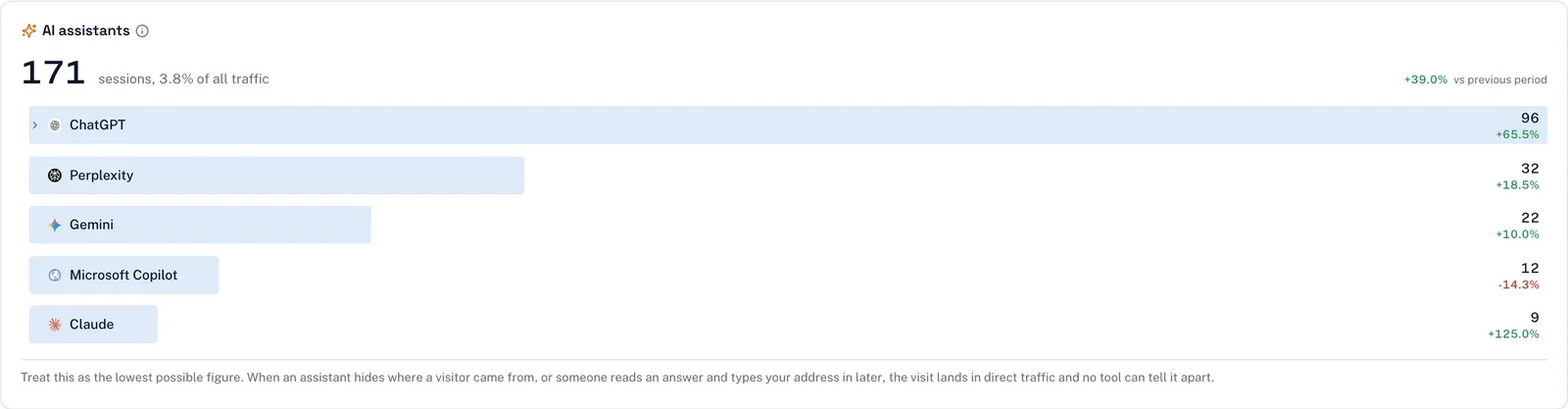
Flowra’s AI assistants card reads these referrals from GA4. It shows them as a share of all traffic, with the change against the previous period. It measures the visits that arrive. It cannot see AI answers that did not send a click, so it labels the figure as a minimum.
SEO KPIs by business type
The short set stays the same shape, but what counts as a conversion changes.
| Business type | Headline KPI | Supporting KPIs |
|---|---|---|
| Ecommerce | Organic revenue and transactions | Non-branded clicks to category and product pages, product page impressions |
| B2B or SaaS | Organic leads, demos or trials, and the pipeline value they create | Non-branded clicks to solution and comparison pages, priority queries on page one |
| Local service | Calls and direction requests from Google Business Profile, plus organic form leads | Website clicks from the profile, impressions for “service + city” queries |
| Publisher or ad-funded | Organic engaged sessions and returning users | Non-branded clicks, impressions by topic, Core Web Vitals |
| Small business (any type) | Leads from search: forms plus calls | Non-branded clicks, Google Business Profile actions |
A small business should track three numbers:
- leads from search
- non-branded clicks
- Google Business Profile calls or direction requests, if it serves a local area
That is enough to see whether SEO is worth the money.
SEO KPIs you shouldn’t track (or at least shouldn’t report)
Some numbers are easy to collect and look impressive, but they tell the client nothing about results.
- Bounce rate as a headline. Use engagement rate instead, and keep it on the team dashboard.
- Domain Authority, Domain Rating or similar scores as goals. Tool vendors create these scores to compare sites. Google does not use them, and you can raise them without gaining a single customer.
- Total keywords ranked. This number grows with every page-three ranking for a query nobody searches.
- Site-wide average position. As explained above, it can fall while things improve.
- Raw backlink count. One link from a relevant industry site beats a hundred from directories.
- Pages published. That is output, not outcome.
So how do you measure SEO success? Use the KPIs and targets you agreed at the start, compared like for like, usually with the same period last year. If those numbers move, the work is succeeding, whatever the vanity numbers say.
How to explain SEO KPIs to clients
Most KPI guides stop at definitions. Clients need two more things: words they understand, and expectations set before the first report.
A plain-language glossary
| Term | What to tell a client |
|---|---|
| Impression | Your site appeared in someone’s Google results, whether or not they scrolled to it |
| Click | Someone clicked through to your site from Google |
| CTR | Out of everyone who saw you, the share who clicked |
| Average position | Your typical place in the results, where 1 is the top. Lower is better |
| Non-branded | Searches that do not include your name, so these are people who did not know you yet |
| Key event | An action that matters to the business: a form sent, a purchase, a call |
| Engagement rate | The share of visits where someone did more than glance and leave |
| Core Web Vitals | Google’s measures of whether pages load quickly and do not jump around |
| AI Overview | The AI-written summary Google sometimes shows above the normal results |
| Zero-click search | A search where the person got their answer on Google and did not click anything |
A script for setting expectations
Use something like this on the kickoff call, then repeat the key lines in the first report.
“We’ll judge this work by three things: leads from search, new people finding you without knowing your name, and how often you show up for the topics that sell your services.” “SEO takes months, not weeks. In the first quarter, impressions and page-one counts move first. Leads follow later.” “Rankings change every day. I’ll show them, but they’re not the goal.” “Some months will dip. When that happens, the report will say why and what we’re doing about it.” “AI answers mean some people get what they need without visiting. We’ll track the visits AI tools do send, and we’ll keep the focus on leads.”
Write the agreed KPIs and targets into the proposal. When a client later asks about Domain Authority, you can point to what you both agreed.
The SEO KPI report: how often, what goes in it, and templates
A cadence that works for most clients:
- Weekly: your team checks a dashboard for sudden drops, indexing problems or pages losing clicks. The client does not need this.
- Monthly: the client report, with the six KPIs and commentary.
- Quarterly: ROI, the year-on-year trend, and the plan for next quarter.
SEO KPI report template
Copy this structure:
- Headline: one sentence with a verdict. “Leads from search up 12% on last year; two service pages are slipping and we are fixing them.”
- KPI table: the six KPIs with this period, the previous period, the same period last year, and the target.
- Wins: two or three, with the page or query named.
- Problems and why: what fell and the cause, using the impressions-versus-clicks checks above.
- What we did: the work completed, linked to the results where you can.
- What is next: the next month’s priorities.
- Appendix: full numbers, rankings, Core Web Vitals and backlinks, for anyone who wants them.
Team dashboard template
The dashboard is for your weekly check. It holds the client KPIs at the top:
| Tile | Source | Date comparison | Filter |
|---|---|---|---|
| Non-branded clicks | Search Console | Last 28 days vs previous period, and vs same period last year | Query doesn’t match your brand regex |
| Priority-topic impressions | Search Console | Same as above | Page or query matches the topic, for example page contains /services/ |
| Organic key events | GA4 | This month vs last month and last year | Session default channel group = Organic Search |
| Page-one count | Search Console | This month vs last month | Your priority query list; count queries at average position 10 or better |
| AI referrals | GA4 | This month vs last month | Session source matches your AI assistant list |
Below those tiles, add the team-only rows:
- organic CTR
- Core Web Vitals status
- pages not indexed, from Indexing > Pages
- a table of pages sorted by the change in clicks
You can build this for free in Looker Studio, which has its own connectors for Search Console and Google Analytics. Google’s Looker Studio help centre explains how to add both as data sources. Use scorecards with a comparison date range for the tiles, and reuse the same regex filters.
How long a report takes, and live dashboards
The first report takes the longest, because you are setting up key events, the branded regex, the priority query list and both templates. After that, pulling the numbers should be quick. The real work is the commentary in sections 4 to 6 of the report, and that is the part clients value.
A live dashboard has clear advantages over a monthly PDF. It is always current, nobody has to export and paste numbers, and the client can check between meetings. The risk is numbers without context: a client who sees a red arrow on a Tuesday will email you. Pair any live view with written commentary each month.
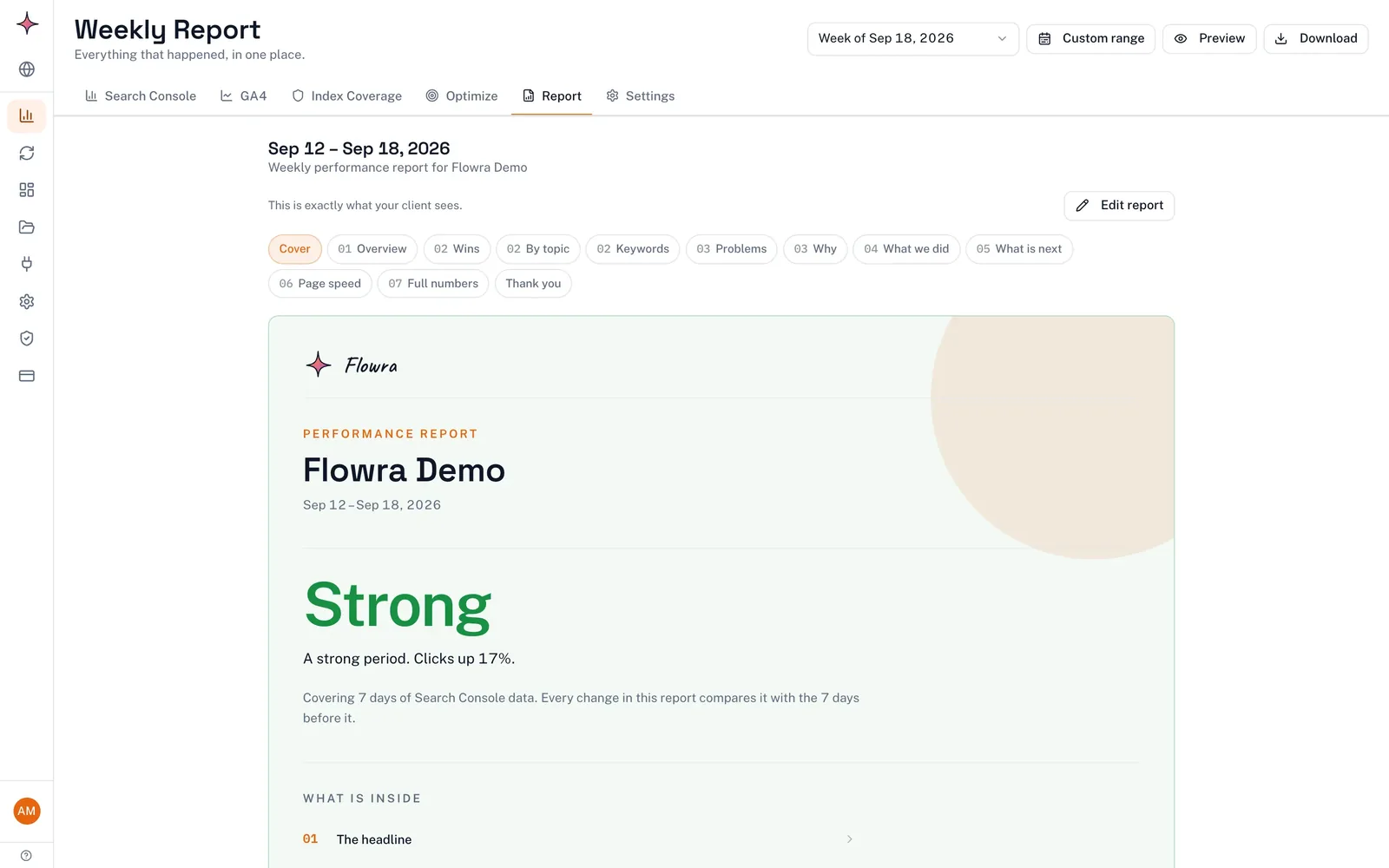
Flowra rebuilds a report like this for each site every week, and the app shows when it is ready. On Starter and above you can share it as a link that always shows the current report, with your agency’s name, logo and colour. On the Agency plan it is a fully white label SEO report; Starter and Pro keep a small “Report made with Flowra” line.
How SEO KPIs differ from paid ads KPIs
Clients often hold SEO to paid ads standards. This table helps you explain why the KPIs differ.
| Paid ads | SEO | |
|---|---|---|
| How you pay | Per click or impression | For the work, not per visitor |
| Time to results | Days | Months, then it keeps compounding |
| Typical KPIs | Cost per click, cost per acquisition, return on ad spend | Organic conversions, non-branded clicks, visibility, ROI on lifetime value |
| When spending stops | Traffic stops | Rankings and traffic decline slowly, if at all |
| Attribution | Usually credited generously in ad platforms | Often undercounted in last-click reports |
The fair comparison is cost per lead over a year, not over a month. Ads win the first month, and SEO catches up as pages keep earning clicks without extra spend.
What to do next
- Write down the client’s business goal and the conversions that represent it.
- Set up those conversions as key events in GA4 and test each one.
- Write down your non-branded regex and bookmark the filtered report.
- Agree a list of priority queries and the six KPIs, with targets, in writing.
- Build the team dashboard and use the script above on your next client call.
- Build the first report from the seven-part template, and lead with the commentary.
Frequently asked questions
What is the most important SEO KPI?
Organic conversions and their value, meaning leads, sales or calls from people who found the site through search. This KPI connects SEO to money, which is what clients pay for. Traffic and rankings matter because they lead to conversions, not on their own.
Is organic traffic a KPI?
Organic traffic is a metric. It becomes a KPI when you tie it to a goal and measure it the same way every period, for example non-branded clicks to service pages against the same month last year. Raw organic sessions can rise from searches that never turn into business.
What SEO KPIs should a small business track?
Three are enough: leads from organic search (forms plus calls), non-branded clicks from Search Console, and Google Business Profile calls and direction requests if the business serves a local area. Check them monthly, and compare each month with the same month last year to allow for seasons.
How do AI Overviews affect SEO KPIs?
AI Overviews can raise impressions while lowering clicks. Google counts appearances in AI features in Search Console, and some searchers get their answer without clicking. Report conversions and AI assistant referrals alongside clicks, and explain the pattern to clients before they notice it themselves.
How often should you send an SEO KPI report?
Monthly suits most clients, with a quarterly review of ROI and the plan. Your team should still check a dashboard weekly to catch drops early. A live dashboard can cover the weeks in between, as long as the monthly report explains what changed and why.